Vollcrypt
Quantum-resistant cryptography, deterministic scanning, and runtime integrity protection.
Vollcrypt Desktop App Module Documentation
Frameless, dark-mode native desktop application for high-performance local file and text cryptography, built with Tauri (Rust) and React + TypeScript + Vanilla CSS.
Download VOLLcrypt Desktop v1.0.0
The first stable desktop release is available from the VOLLcrypt Desktop v1.0.0 release page.
| Platform | Architecture | Package |
|---|---|---|
| Windows | x64 | Setup / Portable |
| Windows | ARM64 | Setup |
| Windows | x86 (32-bit) | Setup |
| macOS | Apple Silicon | DMG |
| macOS | Intel | DMG |
| Linux | amd64 | DEB / AppImage |
v1.0 Hybrid Signing Key Migration
Vollcrypt Files v1.0 exports 64-byte hybrid signing secret keys based on the canonical ML-DSA-65 seed. Legacy 4064-byte hybrid signing secret keys from 0.x releases cannot be converted and are rejected. Generate and register a new hybrid signing key before upgrading an existing signing deployment. Existing encrypted containers, recipient keys, public signing keys, and previously generated signatures remain compatible and verifiable.
Interface Showcase
Here is a visual walkthrough of the Vollcrypt Desktop application interface:
1. Main Cryptography Card & Drag-and-Drop Ingestion
The application features a modern, frameless, dark-mode window with custom titlebar controls and intuitive drag-and-drop file imports.
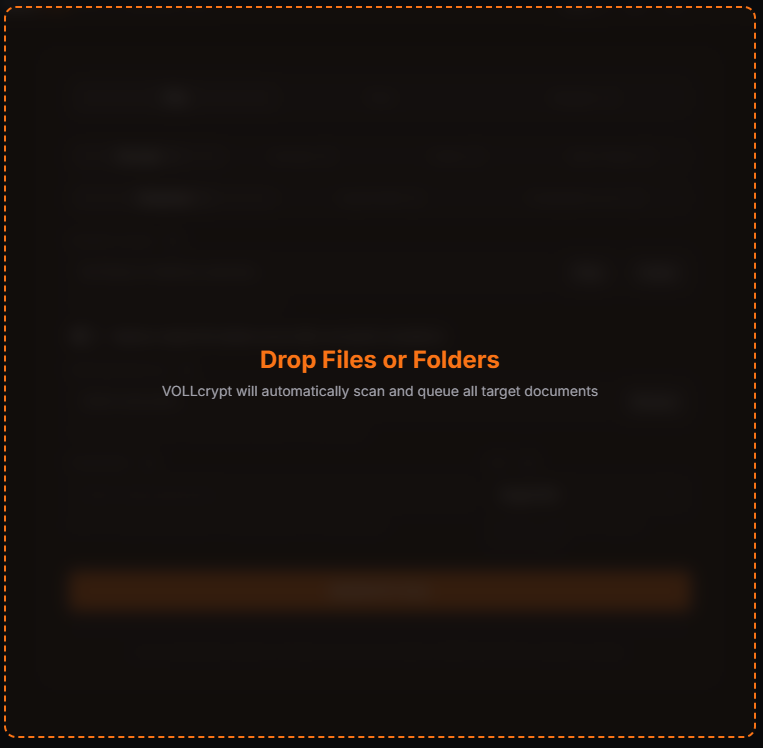 Drag-and-drop overlay displaying the glassmorphic state when hovering files over the window.
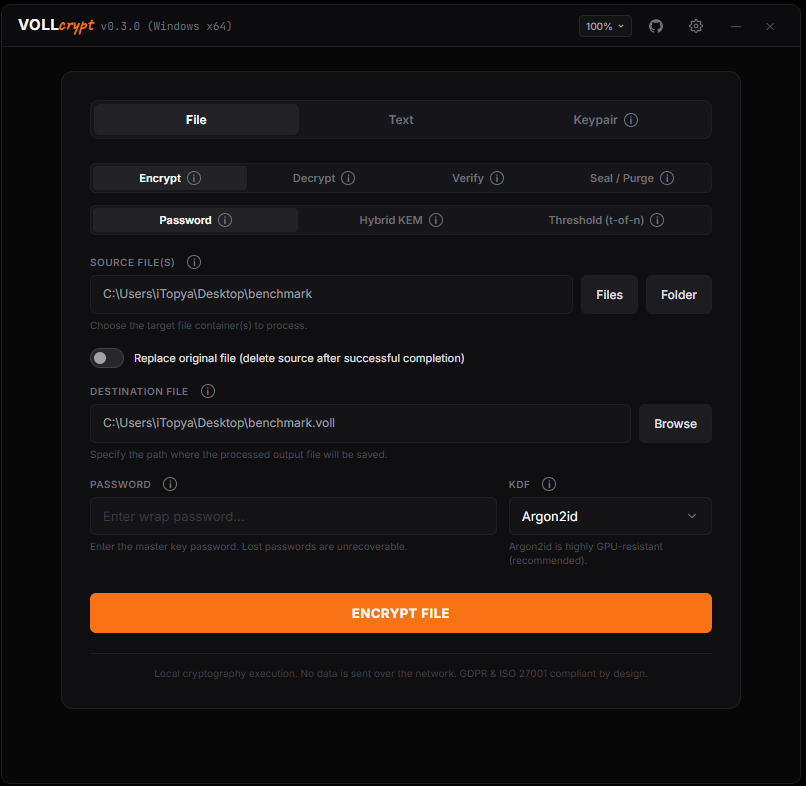 File encryption panel with a selected folder path queued, Argon2id KDF configuration, and password field.
2. Advanced Security Configurations & Decryption
In the Decrypt panel, users can configure release modes, signature verification policies, rollback pin epochs, and launch RAM-only previews.
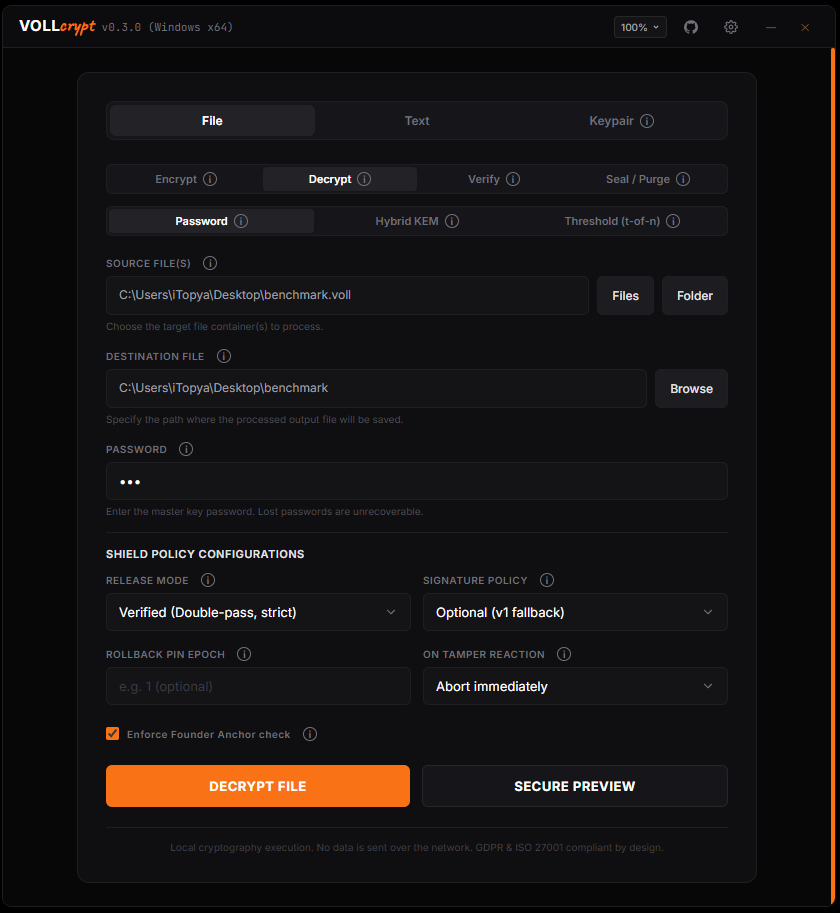 File decryption workspace displaying advanced Shield Policy Configurations and the Secure Preview launcher.
3. Secure Preview (RAM-Only Mode)
The secure preview mode decrypts containers entirely in RAM to allow browsing folder structures and reviewing text files without writing plaintext data to disk.
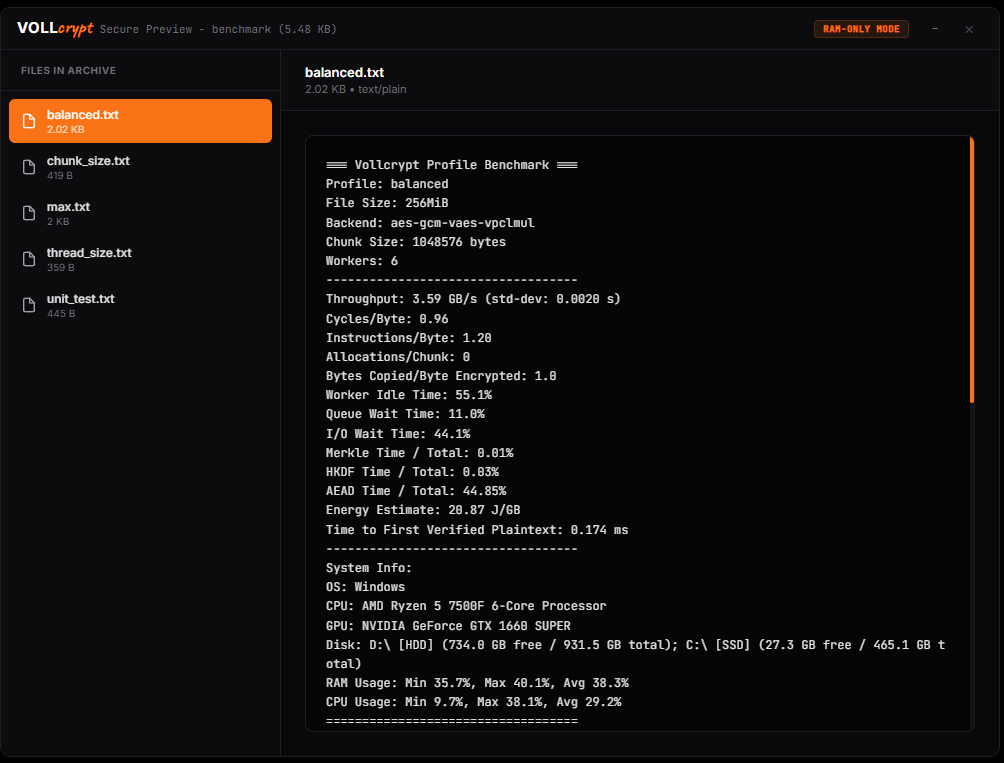 In-memory secure preview rendering benchmark files and system performance metrics.
4. Container Verification & Sovereign Sealing
Audit container signatures and tag integrity, or perform GDPR-compliant erasure/crypto-shredding operations.
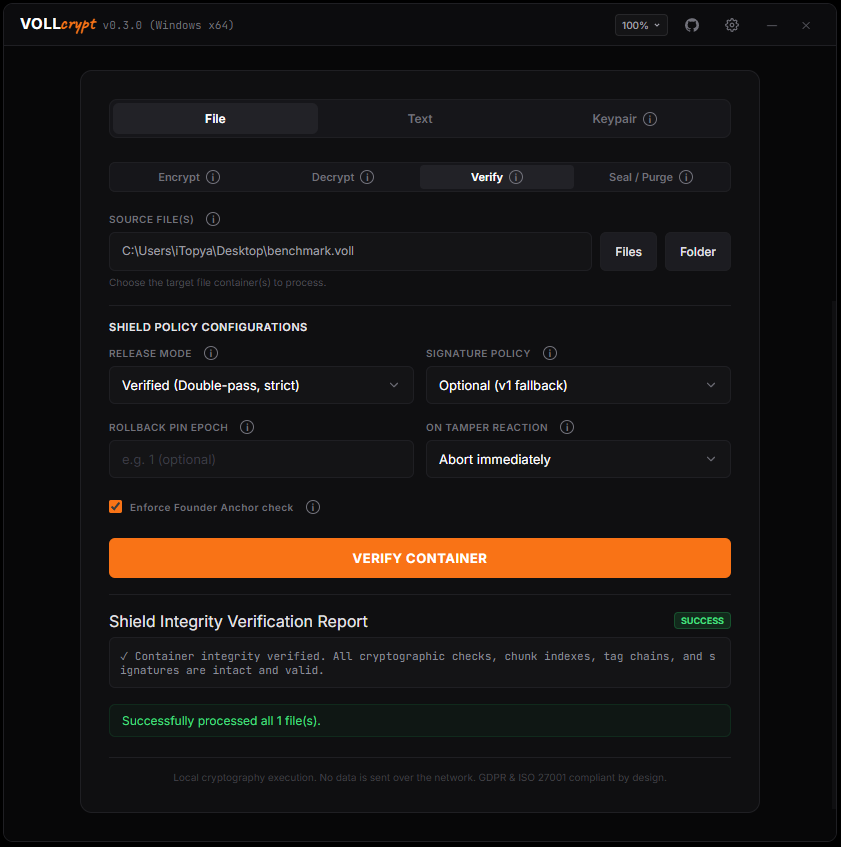 Successful Shield Integrity Verification Report confirming valid signatures and tag chains.
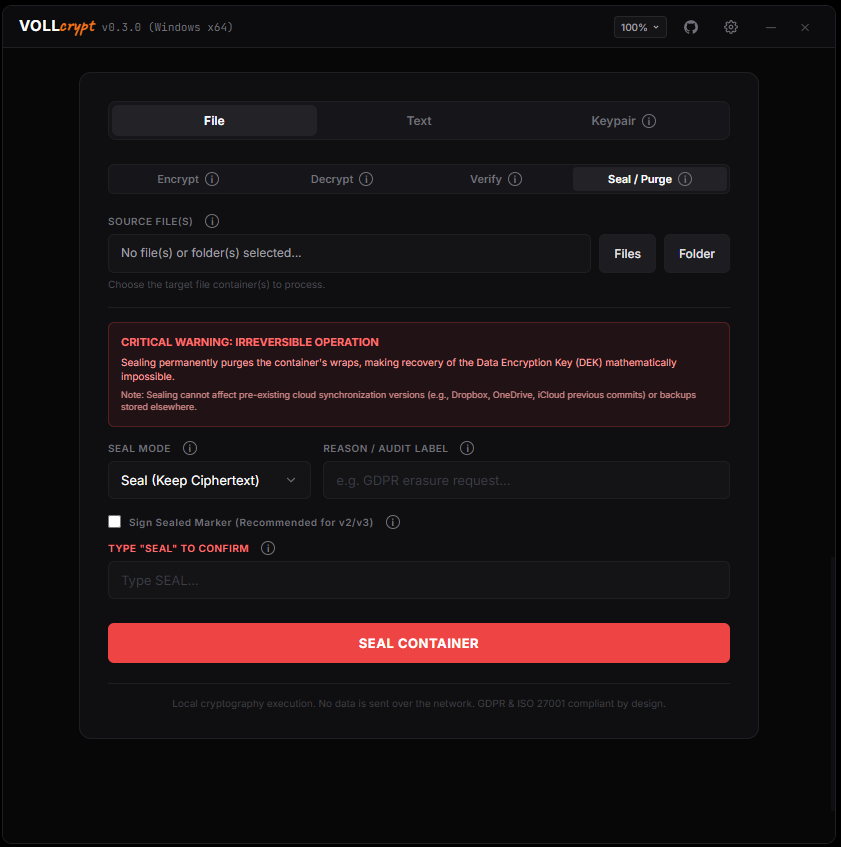 Irreversible Sealing workspace showing critical warnings and the Type-to-Confirm security input.
5. Shamir’s Secret Sharing (Threshold Key-Splitting)
Split container keys into n shares and reconstruct the original key using a threshold t of SSS shares, featuring offline QR code export and offline drag-and-drop QR scanning.
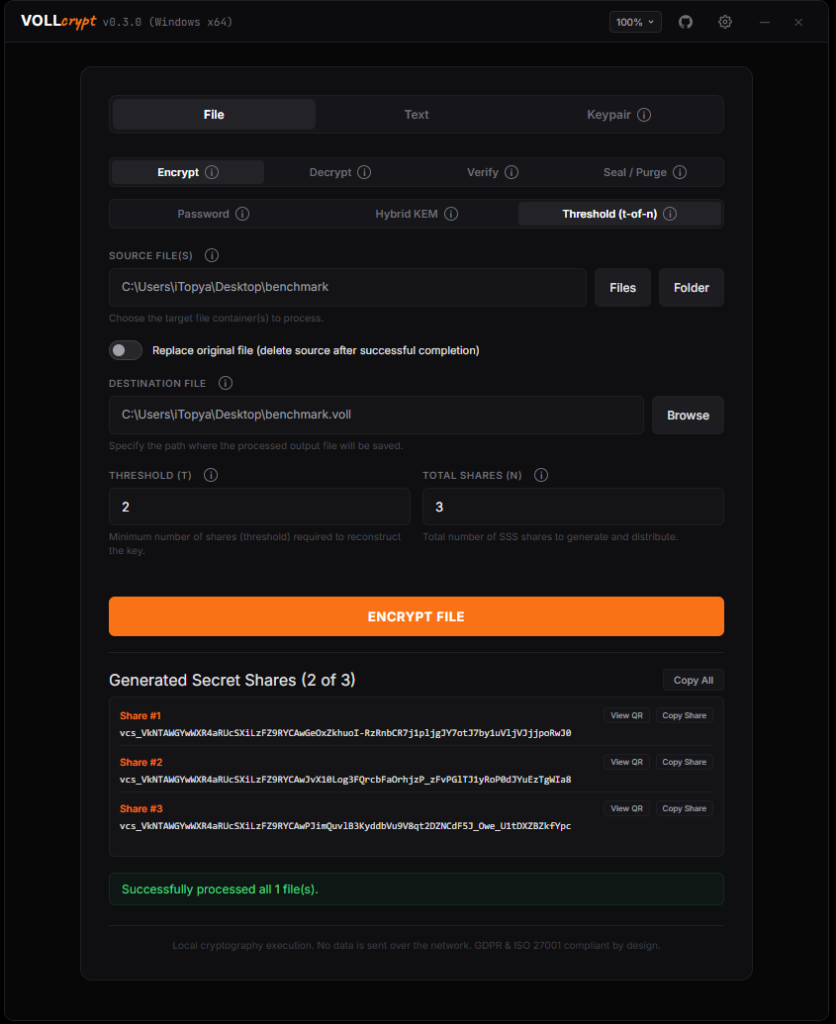 Secret shares generated with copyable strings, offline QR Code views, and individual share copy buttons.
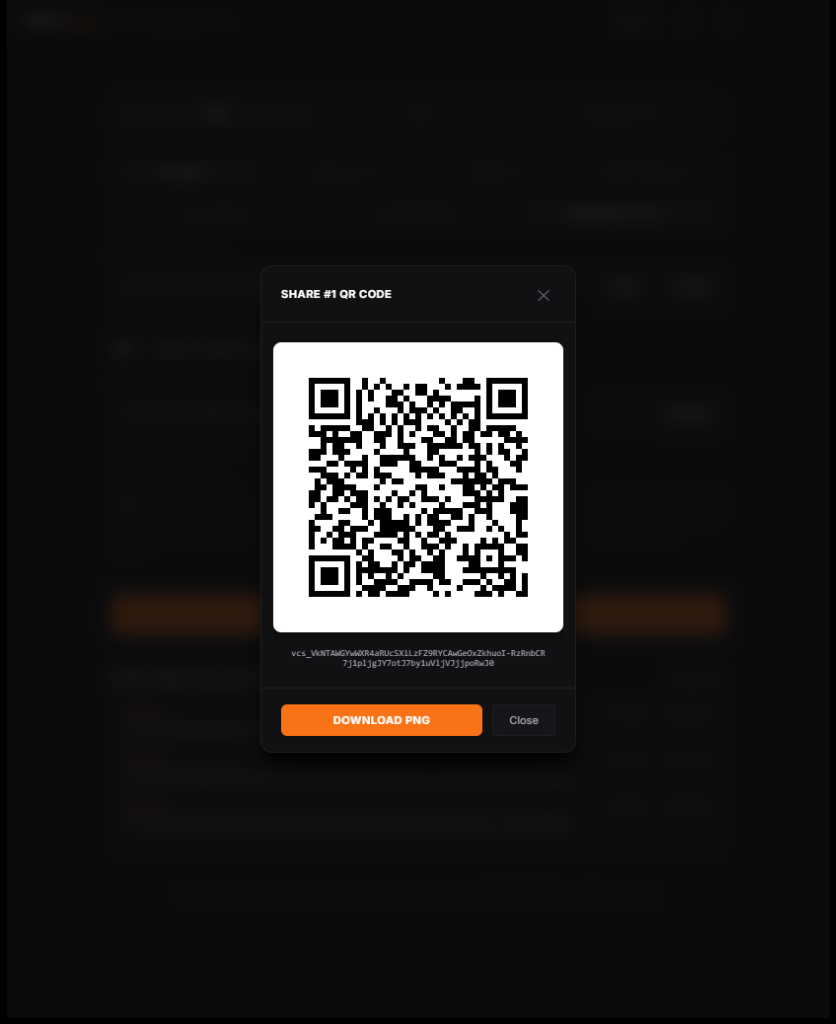 Offline QR Code pop-up showing the share vector and PNG download button.
6. Preferences & Performance Tuning
Configure performance profiles (High Performance, Balanced, Low Resource, Paranoid), clear clipboard history, and manage secure preview memory constraints.
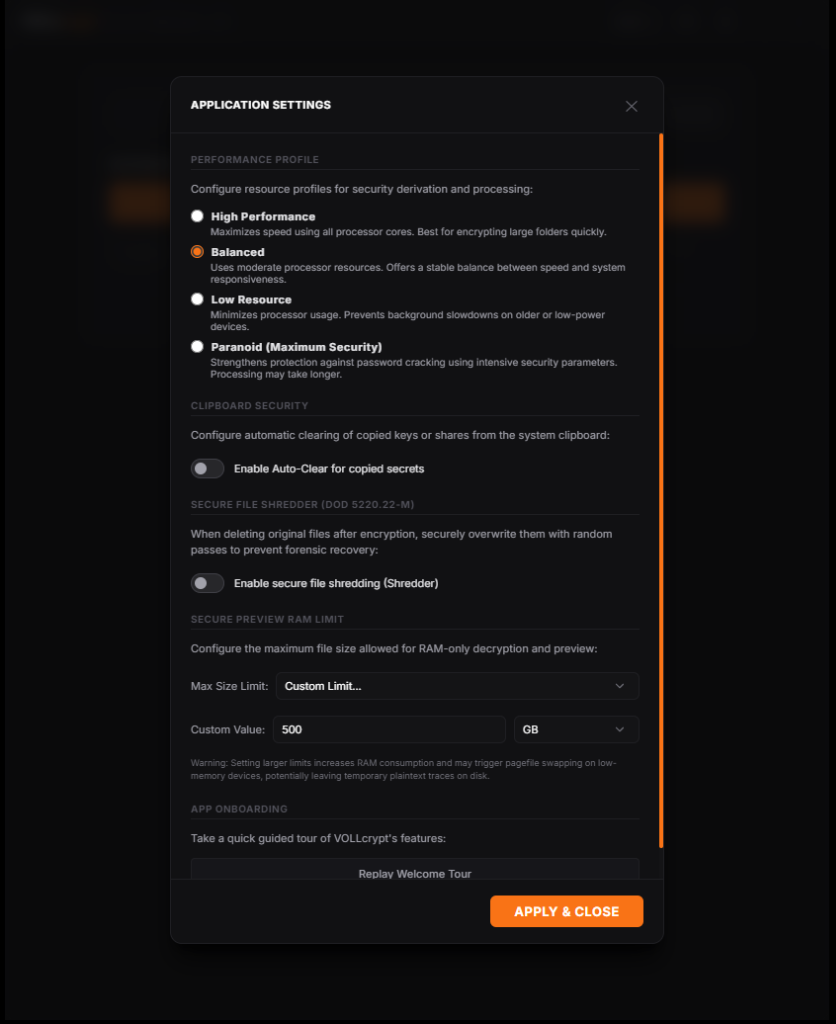 Preferences modal exposing file shredder controls and custom memory-limit dropdown selectors.
🏗 Architectural Design
Vollcrypt Desktop is built as a hybrid desktop application utilizing Tauri v2 for the application runtime and native OS integrations, and React + Vanilla CSS for the user interface.
graph TD
    classDef ui fill:#df5c3f,stroke:#333,stroke-width:1px,color:#fff;
    classDef tauri fill:#4a90e2,stroke:#333,stroke-width:1px,color:#fff;
    classDef rust fill:#df5c3f,stroke:#333,stroke-width:1px,color:#fff;

    UI[React Frontend UI] -- Tauri IPC (Commands) --> Backend[Tauri Rust Backend]
    Backend -- Direct Cargo Link --> Core[vollcrypt-files-core]
    Backend -- Native Choosers --> OS[Windows/macOS/Linux File System]
1. Tauri Rust Backend (src-tauri/)
- Interoperates natively with the vollcrypt-files-core Rust crate.
- Exposes secure native commands to the frontend via Tauri’s IPC (Inter-Process Communication) layer.
- Handles multi-threaded cryptographic file operations, native file dialogs, and OS window management safely.
2. React + TypeScript Frontend (src/)
- Styled using a custom, high-fidelity dark-mode interface with orange highlights.
- Border outlines on Webview click are reset globally (
outline: none !important) to enforce a flat, premium design. - Communication with the Rust backend is type-safe and bound using
@tauri-apps/api.
3. Custom Frameless UI Window
- Native window titlebars and borders are disabled (
"decorations": false) for a cohesive, modern layout. - Custom titlebar controls are built in React with window dragging regions (
data-tauri-drag-region), minimize, maximize/maximize-toggle, and close functions. - A GitHub repository link button is integrated next to the window controls, using Tauri’s native opener API.
- Frameless Windows 11 colored focus borders are disabled using
"shadow": falseto ensure a consistent dark background silhouette. - Adjusted Viewport Dimensions: The default startup window height was increased to
780pixels to comfortably display advanced parameters (KDF settings, signature policies, drag-and-drop zones) without crowding the layout.
🔒 Cryptographic Capabilities
The desktop app encapsulates the following functionalities:
1. Symmetric File Cryptography
- Derives strong keys from user-specified passwords using Argon2id (customizable parameters) or PBKDF2-SHA256.
- Streams file contents in chunks utilizing AES-256-GCM for maximum performance and minimum memory footprint.
- Automatically saves encrypted files with the
.vollextension. - Replace Original File Option: Allows users to automatically overwrite/delete the raw plain text source file on disk upon successful encryption, automatically hiding the output path picker when active.
2. Asymmetric Keypair Generator
- Generates post-quantum hybrid keypairs containing:
- ML-KEM-768 (FIPS 203) for quantum-resistant key transport.
- X25519 (ECDH) for classical forward secrecy.
- Ed25519 for digital signature and sender authenticity.
- Exports public key files (
.pub) and private key files (.sec) securely.
3. Asymmetric File Cryptography (Multi-Recipient Broadcast Mode)
- Multi-Recipient Broadcast Encryption: Allows a container to be encrypted for multiple recipients concurrently. The main file/text payload is encrypted with a single AES-256-GCM key, which is then wrapped separately for each recipient’s public key (ML-KEM-768 + X25519) and appended to the header wraps collection.
- Decrypts files using any single authorized recipient’s private key (
.sec) by scanning the header wraps collection to locate and unwrap the corresponding entry. - Verifies sender signature on decryption to prevent key substitution and MITM attacks.
- Replace Original File Option: Allows users to automatically delete the raw plain text source file on disk upon successful encryption.
4. Threshold (t-of-n) SSS Wrap Mode
- Secures container keys under a Shamir Secret Sharing (SSS) wrap policy over GF(2^8).
- Automatically splits the container’s Threshold Master Secret (TMS) into $n$ SSS shares.
- Outputs copyable and distributable share strings prefixed with
vcs_and protected by truncated SHA-256 integrity checksums. - Offline QR Code Export: Generates SSS shares as SVG vectors offline in the Rust backend, with in-app previews and high-resolution PNG download capability (painted onto a white-padded canvas to bypass Tauri cross-origin restrictions).
- Drag-and-Drop QR Code Scanning: Features an offline, client-side drag-and-drop or upload area for SSS share images. Decodes share codes using multi-scale down-sampling to optimize detection rate for photos taken with mobile cameras.
- Restores key access and decrypts containers directly once at least $t$ valid shares are supplied.
5. Sovereign Sealing & Crypto-Shredding
- Offers a GDPR-compliant irreversible deletion mechanism for containers:
- Seal Mode: Erases all key-wrapping entries from the container header, keeping the encrypted payload intact but completely keyless (auditable zero-recoverability).
- Purge Mode: Erases all key-wrapping entries and overwrites/zeroizes the ciphertext block payload on disk (complete crypto-shredding).
- Supports signing the sealed marker with a digital key (Ed25519 or Post-Quantum) for proof-of-erasure audits.
- Safe Temp File Handling: The sealing file stream operations are scoped atomically. If the sealing or file replacement fails at any point, the backend automatically deletes the temporary
.tmp_sealfile from disk to prevent leftover clutter.
6. Shield Integrity Verification Policies
- Lets users configure and audit container integrity signature policies before decryption:
- Release Modes: Choose between strict double-pass verification (
ReleaseMode::Verified) or speed-focused on-the-fly (ReleaseMode::Streaming) streaming. - Tamper Reactions: Define reactive policies (Abort, Abort & Report, or Attempt Block Recovery) when container anomalies, timestamp rollbacks, or founder anchor mismatches are detected.
- Release Modes: Choose between strict double-pass verification (
- Automated Signature Policy Routing: Automatically routes the signature policy to Optional (v1 fallback) when password or SSS threshold decryption tabs are selected to ensure friction-free decryption, and restores strict verification to Required (v2/v3 check) when switching back to recipient or group tabs.
7. Text Cryptography & File Interoperability
- In-memory text encryption/decryption yielding Base64-encoded container packages.
- Features binary file compatibility:
- Saved encrypted texts are decoded back to raw binary bytes and written to disk as
.vollcontainer files. - Users can decrypt these
.volltext container files directly in either the Text decryption or File decryption tabs.
- Saved encrypted texts are decoded back to raw binary bytes and written to disk as
- Decrypted text files automatically default to
.txtextension presets on picker launch.
8. Secure File Shredder (DoD 5220.22-M)
- Integrates a settings toggle to securely delete the original unencrypted files or folders on disk once the
.vollencrypted container is successfully generated. - Employs the DoD 5220.22-M sanitization standard, overwriting the source file’s byte storage with multiple passes of random data and zeroes before releasing the storage back to the OS.
- Prevents forensic data recovery and reconstruction of the plain source files from physical disk sectors.
9. UI/UX Enhancements
- Decryption Output Restrictions: Safety enforcement removes the “Replace original file” option in Decryption panels to ensure decrypted data is always written to a new standalone file without modifying the encrypted source.
- Keypair Info Circle Tooltips: Provides interactive, non-blocking informational tooltips next to key management and generation components. Far-right tooltips are dynamically aligned left to ensure they fit within the custom frameless window bounds.
- Real-Time Progress & ETA: Provides visual feedback during file operations with a smooth progress bar, percentage tracker, and remaining time (ETA) display in English.
🔗 Native OS Integrations
1. Right-Click Context Menu (“Encrypt with VOLLcrypt”)
Automatically registers a native right-click shortcut on application launch to encrypt files directly with VOLLcrypt:
- Windows 10 & 11: Creates registry entries in
HKCU\Software\Classes\*\shell\VOLLcrypt. On Windows 11, the command is accessible via the Show more options context submenu due to modern OS restrictions. On Windows 10, it appears directly in the primary context menu. - Linux (GNOME / Nautilus): Deploys a shell script inside the user’s Nautilus scripts folder (
~/.local/share/nautilus/scripts), accessible via the Scripts submenu. - Linux (KDE / Dolphin): Registers a
.desktopservice menu inside Dolphin’s service menus path, accessible via the Actions submenu. - macOS: Configures a native Automator Service/Quick Action workflow inside
~/Library/Services, accessible under Quick Actions or Services.
2. Window Drag & Drop Integration
Features native drag-and-drop file ingestion using Tauri’s window event listeners:
- Dragging files or directories over any part of the application window displays a fullscreen glassmorphic overlay.
- Dropping items clears the overlay, recursively extracts all nested files, and loads them into the queue.
- Smart Tab Routing: Automatically routes dropped files based on their extension. Dropping a
.vollfile immediately redirects the user to the Decrypt view and loads it into the input, while dropping other file extensions or folders loads them into the Encrypt view.
3. Recursive Folder Encryption & Decryption
- Integrates a Folder selection picker next to the Files button.
- Resolves folder paths recursively on the backend using standard Rust APIs, allowing entire directories to be scanned, queued, and processed sequentially with individual progress reporting.
4. File Association & Shell Integration
- File Association: Registers
.vollfiles with the OS during installation or application launch. Double-clicking a.vollfile in the native file manager (Explorer, Finder, Files) automatically launches VOLLcrypt and loads the file in the Decrypt tab. - Custom File Icons: Windows Explorer displays
.vollcontainers with a custom, branded lock icon instead of a generic white paper icon. - Instant Icon Cache Refresh: On Windows, registers file associations and triggers the native
SHChangeNotifyAPI to instantly rebuild the desktop icon cache, applying new file associations without requiring a system reboot.
5. Native Toast Notifications
- Notifies users with cross-platform native bubble/toast notifications when long-running cryptographic operations (e.g. large file encryption or directory packing) complete in the background:
- Windows: Invokes an asynchronous PowerShell-based balloon notification (
NotifyIcon) to reliably display messages even if native system notification settings are restricted. - Linux: Executes standard
notify-sendcommands to interface with system-wide notification daemons (GNOME, KDE, etc.). - macOS: Fires AppleScript-based (
osascript) notification displays native to macOS Notification Center.
- Windows: Invokes an asynchronous PowerShell-based balloon notification (
Cross-Platform Rendering & Theme Design
VOLLcrypt’s dark-themed, frameless visual layout has been carefully optimized and tested to ensure perfect color fidelity and rendering across Windows, macOS, and Linux:
- Color Consistency: Achieved via CSS variables (
--accent-color,--accent-color-hover) utilizing high-contrast HSL/hex palettes. The theme uses#070708as the base frame background,#0f0f11for the main cards, and#f97316for orange accents. This provides a highly premium and uniform appearance on both OLED and standard IPS panels. - Visual Contrast: Background-to-text contrast ratios meet WCAG AAA requirements (7:1+ for headers, 4.5:1+ for body text), assuring clear readability on varying monitors and systems.
- Transparent Webview Compositing:
- The application uses
"transparent": truein the Tauri window configuration to allow beautiful 10px rounded borders. - To prevent rendering issues on Linux distributions where compositing might be disabled or handled differently, the
bodyis styled transparently while the main.window-frameretains a solid#070708background. This ensures that no visual artifacts or pitch-black blocks appear on screen edges.
- The application uses
- Scrollbar Consistency: Custom scrollbars use
-webkit-scrollbarvariables, which map natively to WebView2 (Windows), WebKit (macOS), and WebKitGTK (Linux) engines, maintaining clean, ultra-thin scrollbars styled in theme colors.
💻 OS Compatibility & Architectures
1. Windows 10 & Windows 11 Support
Tauri uses the Microsoft WebView2 runtime to render the frontend.
- Windows 11: WebView2 is pre-installed natively in the operating system.
- Windows 10: To support older versions of Windows 10, the installer is configured with
"webviewInstallMode": { "type": "downloadBootstrapper" }in tauri.conf.json. If WebView2 is missing on the client PC, the installer downloads and runs the WebView2 Bootstrapper automatically.
2. Multi-Architecture Configurations
The desktop application compiles for the following architectures:
- x64 (
x86_64-pc-windows-msvc/x86_64-apple-darwin/x86_64-unknown-linux-gnu) - ARM64 (
aarch64-pc-windows-msvc/aarch64-apple-darwin) - x86 (
i686-pc-windows-msvc32-bit Windows)
🛡️ Security & Privacy Features
- Local Cryptographic Processing: File contents and cryptographic keys are processed on-device and are not transmitted. The application does not send telemetry; installation dependencies such as WebView2 and links explicitly opened by the user may use the network.
- Privacy-Focused Local Processing: File contents and cryptographic keys remain on the user’s device. Regulatory compliance still depends on the deployment, policies, and operational controls around the application.
- Uninstaller Safety: When the application is uninstalled:
- Application binaries, registry settings, AppData folders, and shortcuts are deleted.
- User-encrypted files (
.volldocuments) are preserved and never deleted, protecting user data from accidental loss.
⚙️ GitHub CI/CD Workflows
CI/CD pipelines are split into separate workflows to prevent build conflicts:
- 🖥️ Desktop CI (ci-desktop.yml): Installs Linux build dependencies (libwebkit2gtk-4.1, libxdo) and verifies Rust & React compilation on every push affecting the desktop directory.
- 📦 Desktop Release (release-desktop.yml):
- Triggers on tag pushes (
v*) or manually via the GitHub Actions UI (workflow_dispatch). - Compiles and bundles installers for Windows (x64, ARM64, x86), macOS (Intel, Apple Silicon), and Linux (x64 deb & AppImage) and uploads them to a draft GitHub Release.
- Triggers on tag pushes (
🚀 Building & Running Locally
Prerequisites
- Node.js LTS (≥ 18)
- Rust (Stable ≥ 1.76)
- C++ Build Tools (e.g. Visual Studio Build Tools on Windows)
Steps
# 1. Navigate to the desktop directory
cd vollcrypt-desktop

# 2. Install NPM dependencies
npm install

# 3. Start development server (hot-reloads frontend and backend)
npm run tauri dev

# 4. Compile and package production installers
npm run tauri build
The compiled installers will be located under:
- MSI Installer:
target/release/bundle/msi/ - EXE Installer:
target/release/bundle/nsis/